The Basics:
The Samsung Smart Remote works in two modes: Bluetooth and infrared (IR). It’s designed to connect via Bluetooth and pairs automatically when you first set up your TV. If it ever becomes unpaired, it switches to IR, allowing you to control the TV like a traditional remote. It can only operate in one mode at a time—either Bluetooth or IR.
| Bluetooth | IR |
| Uses radio frequency, which can pass through solid objects | Uses pulses of infrared light, and needs an unobstructed line of sight to a receiver. |
| Transmits in all directions | Must be aimed directly at the TV |
| High bandwidth, allows for complex communication and even voice commands |
Low bandwidth, only simple codes for each button push |
| 2-way communication between the TV and remote | 1-way communication only from the remote to the TV |
The remote absolutely needs to be in Bluetooth mode if you want it to function flawlessly with a Deco TV Frame. Why? Well, because the frame cleverly hides the IR receiver that's situated on the TV's bottom bezel.
📌 In Bluetooth mode, the remote cleverly bypasses the sensor on the bottom of the TV. Instead, the receiving antenna is actually tucked away behind the screen of the TV.
So how do I know which mode I'm using?
If you have a Deco TV Frame on your Frame TV and your remote is stuck in IR mode, you'll notice that it will only work if you're practically hugging the TV. But no worries, there's a simple way to confirm. Just take a peek at the red status light on the remote: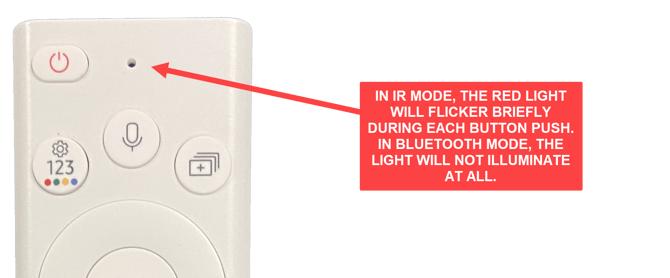
In those sunny situations, spotting the red light on the remote can be a bit of a challenge. So, you might need to give it a little shade with your hand to get a better view.
If you don't have a Deco TV Frame on your TV, you can also determine the mode by checking the red power light on the TV itself.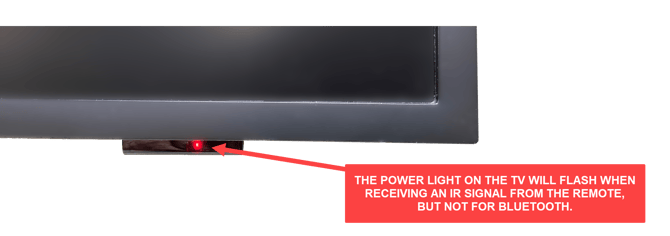
Oh, and if the light isn't shining and the TV isn't responding, it's probably because the remote's battery is dead. So, before you move forward, make sure the remote has a good charge. If you discover that the remote is in IR mode, then you can skip ahead to the section on pairing the remote.
It looks like my remote is using IR (Re-pairing)
If you happen to discover that your remote is in IR mode, don't fret! It simply means that your remote has lost its Bluetooth connection with the TV and needs to be re-paired. Luckily, this can easily be done with a simple button sequence on the remote.
NOTE- Before you can begin the pairing process, it's important to ensure that there's a clear line of sight from the remote to the sensor on the bottom of the TV. If you have a Deco frame on your TV, you'll need to remove it or at least unlatch it at the bottom and move it away from the TV to ensure a direct line of sight to the IR sensor.
Once the sensor is uncovered, you're ready to start the pairing process. Make sure to keep the remote within just a few feet of the TV while doing this.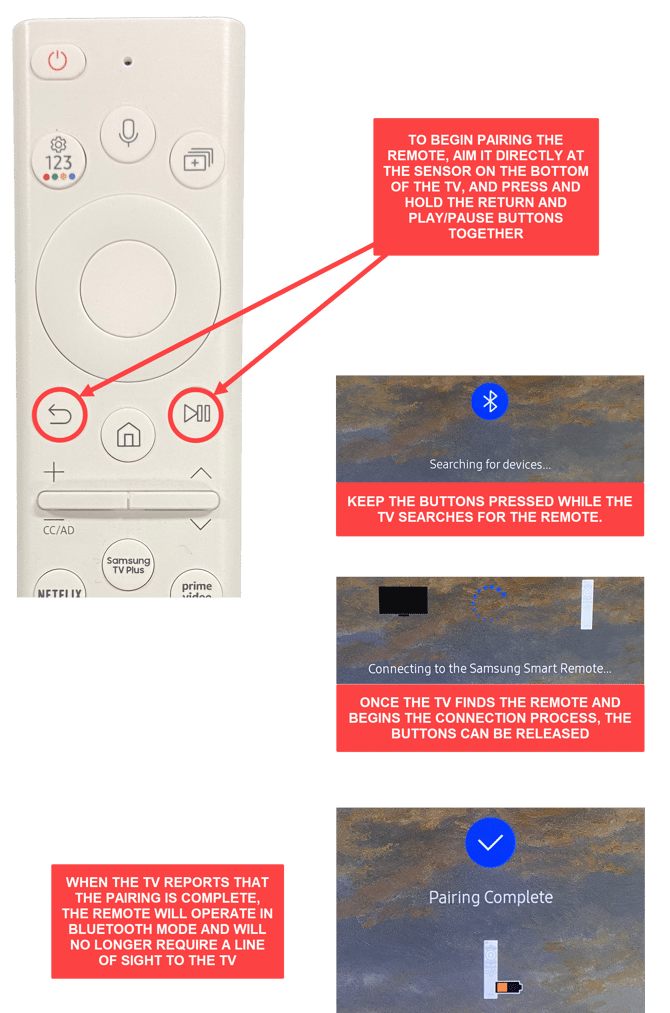
If the remote refuses to pair and you encounter an error message like "No Device Found" or "Another Remote is Already Paired," don't give up just yet! It may take a few attempts before a successful pairing is achieved. You might want to try moving a little closer to the TV or consider charging the remote's battery if it's running low. Keep at it, and you'll get there!
We also recommend power cycling the TV by unplugging the One Connect Box from its power source for about 30 seconds before plugging it back in and re-attempting the repair.
Power cycling the TV in that manner will allow it to reset its remote pairing and may allow the repair to be completed.
📌 After pairing, if you want to test the result, simply use the remote with your hand covering the front of it to block any possible IR signal. If it works, then you are ready to put your Deco frame back on the TV and enjoy.
I'm using Bluetooth, but it's still not working (Soft Reset)
If you find that your remote is in Bluetooth mode but your TV is still not responding correctly, or if the repair process doesn't seem to be working, no need to worry! It might just need a little reset. This nifty trick will give the software running on the remote a fresh start, without affecting its pairing with the TV.
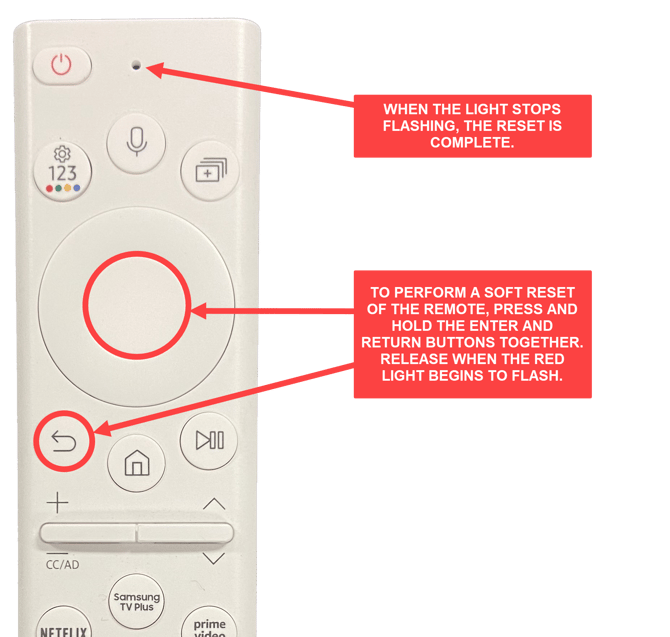
After the reset is complete, you can reattempt the pairing process with the back and play/pause buttons.
If you have attempted resetting and repairing your remote multiple times but are still having issues getting it to work properly while the Deco Frame is installed, a firmware glitch related to the white solar powered remotes could be the cause.
Please contact our Customer Support team as we do have an easy solution that can assist with resolving the problem.
Need Additional Assistance?
 If you have any questions or concerns about your Deco TV Frame, feel free to reach out to our amazing Customer Service team. Just make sure to have your order number ready when you contact us, so we can quickly access the necessary information about your frame and give you top-notch assistance.
Phone- 978-912-7200