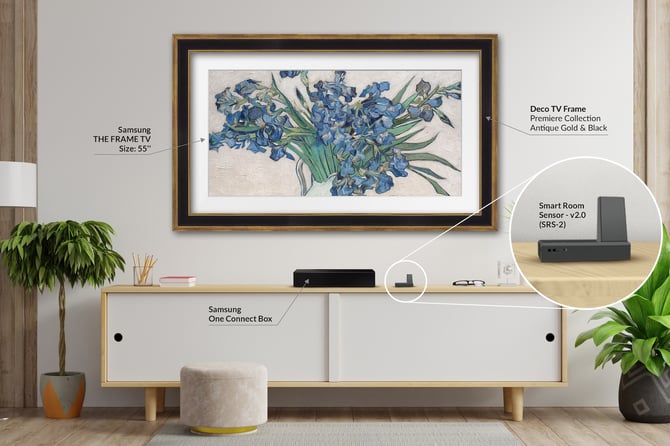
This guide helps diagnose and resolve common issues with the SRS-2. If your SRS-2 is not behaving as expected, follow the troubleshooting steps below to identify the cause and restore normal operation.
I. Troubleshooting the SRS-2
II. Troubleshooting TV Connection Issues
III. Troubleshooting the Deco TV Frames App
IV. Frequently Asked Questions
Basic Troubleshooting
If your SRS-2 is not behaving as expected, start with Basic Troubleshooting below. Most issues can be resolved by checking the System LED status, verifying TV settings, and restarting the device. We recommend reviewing each section.
Troubleshooting the SRS-2
1. Check what the System LED is indicating:
|
System LED Color |
Meaning |
|
Flashing Blue |
TV was powered off manually (remote, power switch, etc.). The SRS-2 will not turn the TV back on. |
|
Flashing Magenta |
Night Mode Active, awaiting room brightness to come above the Dark Threshold. |
|
Flashing Yellow |
Sleep After Active, awaiting motion detection to trigger. |
|
Solid Red |
Signal sent to TV, awaiting response. |
|
Solid Red w/ White Flashes |
Device not connected to Wi-Fi network. |
2. Check Device Placement: Ensure the SRS-2 has a clear view of the room so the light and motion sensors can operate properly.
3. Restart the SRS-2: Unplug from power, wait 10 seconds, and plug it back in.
4. Check Firmware: Open the Deco TV Frames app and verify the SRS-2 firmware is up to date.
Troubleshooting TV Connection Issues
1. Confirm the following settings are configured properly on your Samsung Frame TV (Refer to the SRS-2 Setup Guide if needed)
-
IP Remote: Enabled
-
Art Effect: Enabled
-
Night Mode: Disabled
-
Sleep After: Disabled
2. Confirm your TV is Connected to the Correct Network:
-
Home Page → Settings → All Settings → Connection → Network → Network Status.
-
If you’re using a split-band network (2.4GHz / 5GHz / 6GHz) and experience connectivity issues, you can try connecting the TV to the 2.4GHz network.
-
3. Restart the TV
-
The easiest way to restart the TV is to unplug it from power for 10 seconds and plug it back in.
-
If the power cable is not accessible, you can restart the TV using Maintenance Mode.
-
Home Page → Settings → All Settings → Support → Maintenance Mode → Start → Set a PIN → TV will reboot in Maintenance Mode.
-
After the TV loads into Maintenance Mode: Home Page → Left Side Menu → Click Exit → Enter PIN → TV will reboot a second time outside of Maintenance Mode.
-
Important: If you are having other problems with your Samsung Frame TV that aren’t related to the Art Mode sensors or the IR Sensor, please contact Samsung Support for further assistance. https://www.samsung.com/au/support/
Troubleshooting the Deco TV Frames App
1. Check App Permissions
-
Location Permission - Precise Location Allowed While Using the App (required for device discovery)
-
Local Network Access - Allowed (required on iOS)
2. Confirm your phone is on the correct Wi-Fi network.
-
Your phone must be connected to the same Wi-Fi network as the SRS-2 and the TV.
3. Check for app updates in the App Store or Google Play Store.
Known Issue: TV Does Not Turn Back On
A small number of users have reported that the SRS-2 occasionally fails to wake the TV after it turns off due to Night Mode or Sleep After.
When this occurs:
- The SRS-2 sends the wake command
- The TV does not respond
- The System LED remains solid red
Our team is actively investigating this issue.
If you experience this behavior, please contact us at info@decotvframes.com so we can notify you when a fix becomes available.
Frequently Asked Questions
-
My IR remote isn’t communicating with my TV. What should I do?
-
My phone says it doesn’t have internet when I connect to the Deco Frame network?
Do I need the SRS-2?
The SRS-2 restores light sensing, motion detection, and IR remote functionality when your TV’s built-in sensors are blocked by a decorative frame.
You may not need it if:
You want to leave Art Mode on all the time
You only use the Bluetooth Samsung Smart Remote
Most customers prefer to leave their TV on in Art Mode continuously since power usage is low and there is no risk of image burn.
View Samsung Article: How much power consumption and image retention does The Frame take up?
Night Mode doesn’t seem to be working. What should I do?
How it works:
Night Mode turns the TV off when the ambient light in the room gets too dark and brings it back on when light returns.
Quick Check:
Make sure Night Mode is enabled in the Deco TV Frames app
We recommend a Dark Threshold of 1-2 for most users
Ensure decor/objects are not obstructing the SRS-2
Testing Night Mode (~2 minutes):
Turn Night Mode on & Set Dark Threshold to 1
Turn off Sleep After
Put TV into Art Mode
Cover the SRS-2 completely to block all light
Wait 60 seconds → TV should turn off
Uncover SRS-2 → TV should turn back on within 10 seconds
If the test fails: unplug the SRS-2, wait 5 seconds, plug it back in, and try again.
If the problem persists, contact our Customer Support for further assistance.
Sleep After doesn’t seem to be working. What should I do?
How it works:
Sleep After turns the TV off after the Delay Time, with no motion detected within approximately 20-30 feet, and turns it back on when motion resumes. It can sense motion through some materials, but it may limit the distance the detection can go. Metal will block motion almost entirely.
When the SRS-2 detects motion, the Motion Detection LED will flash green. The device will then wait 30 seconds before searching for motion again.
Important:
If you have Night Mode & Sleep After enabled at the same time, Night Mode will take priority, meaning that when the room is dark, motion will not bring the TV back on.
Quick Check:
Make sure Sleep After is enabled in the Deco TV Frames app
We recommend a Delay Time of 15-30 minutes for most users
Be aware of external motion in the room (pets, ceiling fans, robot vacuums, etc.)
Testing Sleep After (~7 minutes):
Turn Sleep After on & Set Delay Time to 5 minutes
Turn off Night Mode
Put TV into Art Mode
Leave the room or stay out of range (at least 30 ft)
Wait 6 minutes → TV should turn off
Move back in the range → TV should turn back on within 10 seconds
If the test fails: unplug the SRS-2, wait 5 seconds, plug it back in, and try again.
If the problem persists, contact our Customer Support for further assistance.
My IR remote isn’t communicating with my TV. What should I do?
Your SRS-2 has an IR (Infrared) sensor that can be used with all kinds of third-party remotes, such as cable providers or universal remotes. You will see the IR Signal LED flash blue when it receives an IR signal to send to the TV.
Quick Check:
Make sure IR Sensor Enabled is turned on in the Deco TV Frames app
Point the remote at the SRS-2 (not the TV)
Ensure nothing is blocking the sensor
Look up pairing steps for your specific remote
You may need to contact the support team for your specific remote provider
The SRS-2 receives the IR signal and sends it to the TV. If it cannot “see” the remote, it won’t work.
Why does my IR remote feel slower than normal?
A slight delay is normal when using the IR Sensor.
The SRS-2 receives the signal and then sends it to the TV, which adds a small amount of processing time. This delay is affected by network speed and traffic.
For most users, this delay is minimal and does not impact normal use.
My phone says it doesn’t have internet when I connect to the Deco Frame network?
This is expected during setup.
The Deco Frame network is a direct connection to the SRS-2 and does not provide internet access.
Once setup is complete, your phone should be back to your Home Network.
My app can’t find my Samsung Frame TV. What should I do?
Quick Fix:
Make sure the TV is ON (not in Art Mode)
Confirm TV and phone are on the same Wi-Fi
Scan again
If the TV still doesn’t appear:
Enter the IP address manually
- Try hard restarting your TV (See Troubleshooting TV Connection Issues)
Tip: Networks using dynamic IP addresses can occasionally change the IP address of the TV. If your SRS-2 suddenly stops communicating with your TV, double-check that the IP address is still the same, and update it if needed. You can also set a Static IP Address to avoid possible issues.
What happened to the brightness optimization feature?
This feature was removed when the SRS-2 transitioned to wireless operation.
We are working with Samsung to restore this functionality in a future update, but no timeline is available yet.
Still Need Help?
If you were unable to find an answer here, please reach out and contact us! We are happy to help with whatever issue you are experiencing!
Tutorials on Samsung The Frame
 We regularly publish new videos about Samsung The Frame TVs to answer many FAQs to help you get the most of your TV. Be sure to subscribe to our channel to learn more.