![logos v3.png]](https://help.framemytv.com/hs-fs/hubfs/logos%20v3.png?height=40&name=logos%20v3.png)
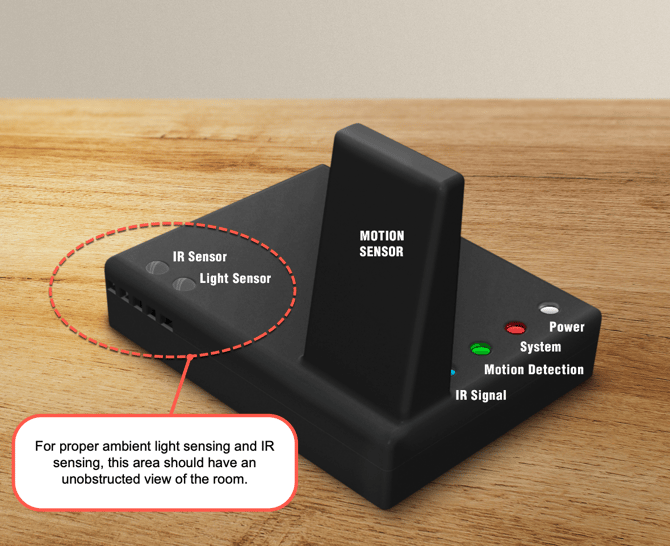
This guide explains in detail the features of the SRS-2 and the Deco TV Frames app.
SRS-2 Features
The SRS-2 (Smart Room Sensor) is a device used wirelessly with the Samsung Frame TV. It is designed to mimic the light, motion, & IR (Infrared) sensors that get blocked from your decorative frame. This is so you don’t lose any of your TV's functionality, while still having a beautiful, exquisite frame customized to your decorative preferences.
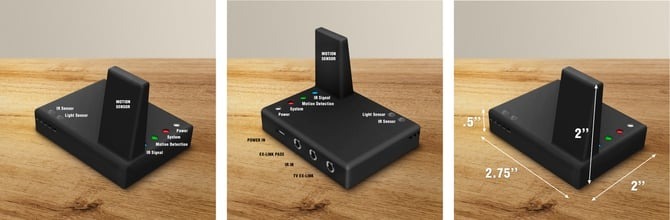
The SRS-2 currently supports 3 main features.
- Night Mode - for light control
- Sleep After - for motion control
- IR Sensor - for infrared remote signals
Night Mode:
Night mode is used to power off the TV in Art Mode when the room’s ambient light is too low and to bring it back on when the light level increases.
- This setting uses the Dark Threshold to determine how much light should be allowed before powering off. The levels range from 1-5, 1 being completely dark and 5 being moderately dim. We recommend setting it to 1 or 2 for most customers.
- When the light level falls below the Dark Threshold, the SRS-2 will wait 30 seconds before sending a signal to turn off the TV.
Sleep After:
Sleep After is used to power off the TV in Art Mode when no motion is detected by the SRS-2 for a set period of time. It will then bring it back on when it detects new motion.
- This setting uses the Delay Time to determine how long after the last detection of motion the device should power off the TV. The options range from 5 minutes to 4 hours.
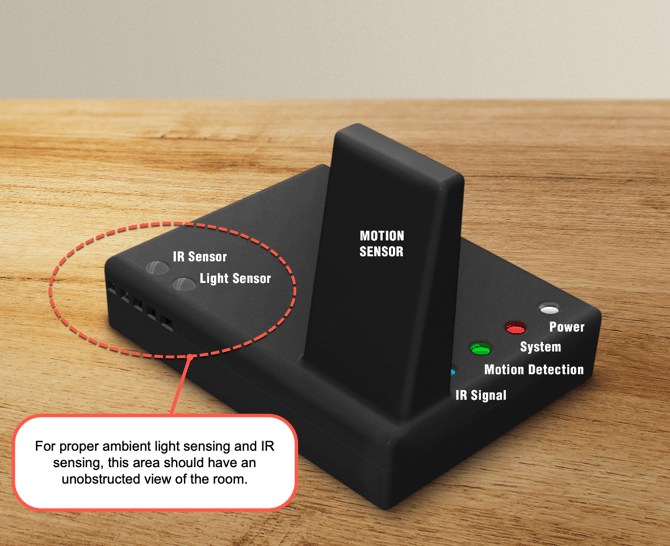
- The Motion Detection light will flash green when it detects motion. After detecting motion, the SRS-2 will wait 30 seconds before searching again.
- Sleed After will not override Night Mode when both are enabled. If the TV is powered off due to light levels, motion will not bring it back on again until after the room brightens.
Important: These features control the TV in place of its own sensors. If the features on the TV are enabled, the SRS-2 will not be able to control the TV properly. Consult the SRS-2 Setup Guide to confirm the TV is properly prepared.
IR Sensor Enabled:
The IR Sensor Enabled setting will control whether the SRS-2 accepts IR (infrared) signals and transmits them to the TV.
- If you use a third-party, universal, or cable provider remote with your TV, you will want this setting enabled.
- If you are using the Samsung Frame TV remote or another remote that is connected with Bluetooth, you can leave this setting disabled.
- When the setting is enabled, the IR Signal light on the SRS-2 will flash blue whenever it receives input.
System Light Indicator:
The System light will change color based on what state the SRS-2 is currently in. These colors, and their meanings, are listed below for reference.
|
System LED Color |
Meaning |
|
Blue |
TV powered off manually (remote, power switch, etc.), will not turn back on by itself. |
|
Magenta |
Night Mode Active, awaiting light level to come above Dark Threshold. |
|
Yellow |
Sleep After Active, awaiting motion detection to trigger. |
|
Solid Red |
Signal sent to TV, awaiting response from TV. |
|
Red w/ White Flashes |
Device not connected to home Wi-Fi. |
Deco TV Frames App
The Deco TV Frames app was developed to allow remote access to the SRS-2. This app is how you set up the SRS-2 and edit the settings to match your preference.
After connecting your device to your TV, you will be able to configure the settings, including:
Night Mode
- Night Mode allows the SRS-2 to automatically turn off your TV
when the ambient light in the room drops to a low level.
- The Dark Threshold setting controls how sensitive Night Mode is to changes in light:
- A threshold of 1 means Night Mode will activate only when the room is completely dark.
- A threshold of 5 means Night Mode will activate even when the room is moderately dim.
Sleep After
- The Sleep After setting controls the Motion Detection feature of the SRS-2.
- When enabled, the TV will automatically go to sleep after a set delay time if no motion is detected in the room.
- Once motion is detected again, the Art Mode display will resume automatically.
- The delay time determines how long the system waits before putting the TV to sleep after detecting no movement.
- IR Sensor Enabled
- The IR Sensor setting should be on when using a third-party
infrared remote (IR) to control the TV, such as from a cable or
satellite provider.
Need Help?
If you run into issues:
- View our Troubleshooting Guide
- Contact Customer Support
We are happy to help get everything working!
Tutorials on Samsung The Frame
 We regularly publish new videos about Samsung The Frame TVs to answer many FAQs to help you get the most of your TV. Be sure to subscribe to our channel to learn more.