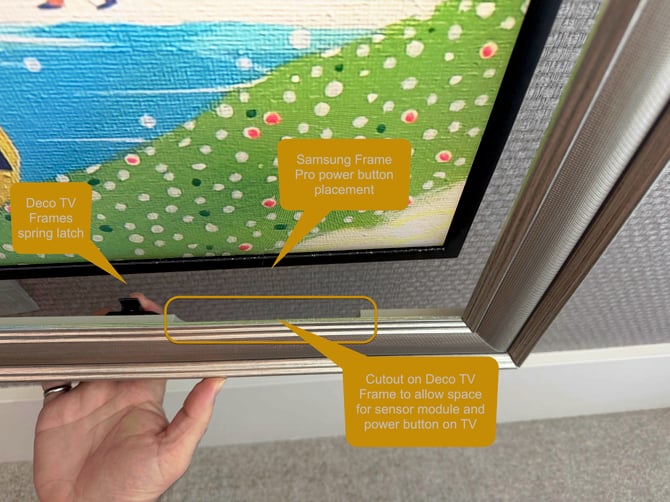
On all models of Samsung The Frame and Samsung Frame Pro TVs made in 2021 and later*, have a physical power button located in the middle of the sensor block on the back of the TV a few iinches from the bottom right corner of the TV. Reach your hand up behind the TV and press the button and from there you can repeatedly press the button to navigate through a few very basic functions such as Power Off and more.
.jpg?width=670&height=1268&name=Samsung-Frame-Pro-Power-Button%20(1).jpg)
* Prior to 2021, this module is located at the bottom center of the TV.
If you are looking at the TV from the front, reach your hand up around the bottom right of the TV and you'll feel the button. If you have a Deco TV Frame and you want to release the frame, just feel for the indentation on the black latch shown above and slide the latch down to release the frame for better access to the power button. You should however be able to reach the power button just fine even with the Deco TV Frame fully latched in place.
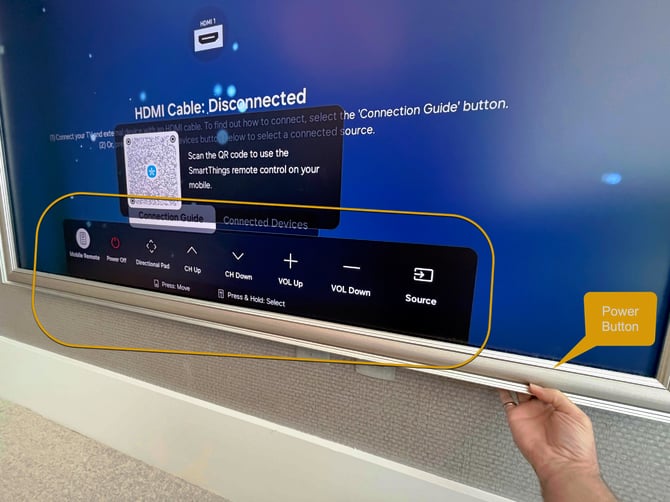
On you press the power button, you'll see the following menu of basic commands. Each time you tap the power button it will advance horizontally to the next item in the menu. Once you reach the menu item you want, Press & Hold the button to select that item.

Not Familiar with Deco TV Frames?
Check out the full collection of over 50 frames styles designed specifically for Samsung The Frame and Samsung Frame Pro televisions at https://decotvframes.com